Your charting platform is better than this one. It cannot draw any of this.
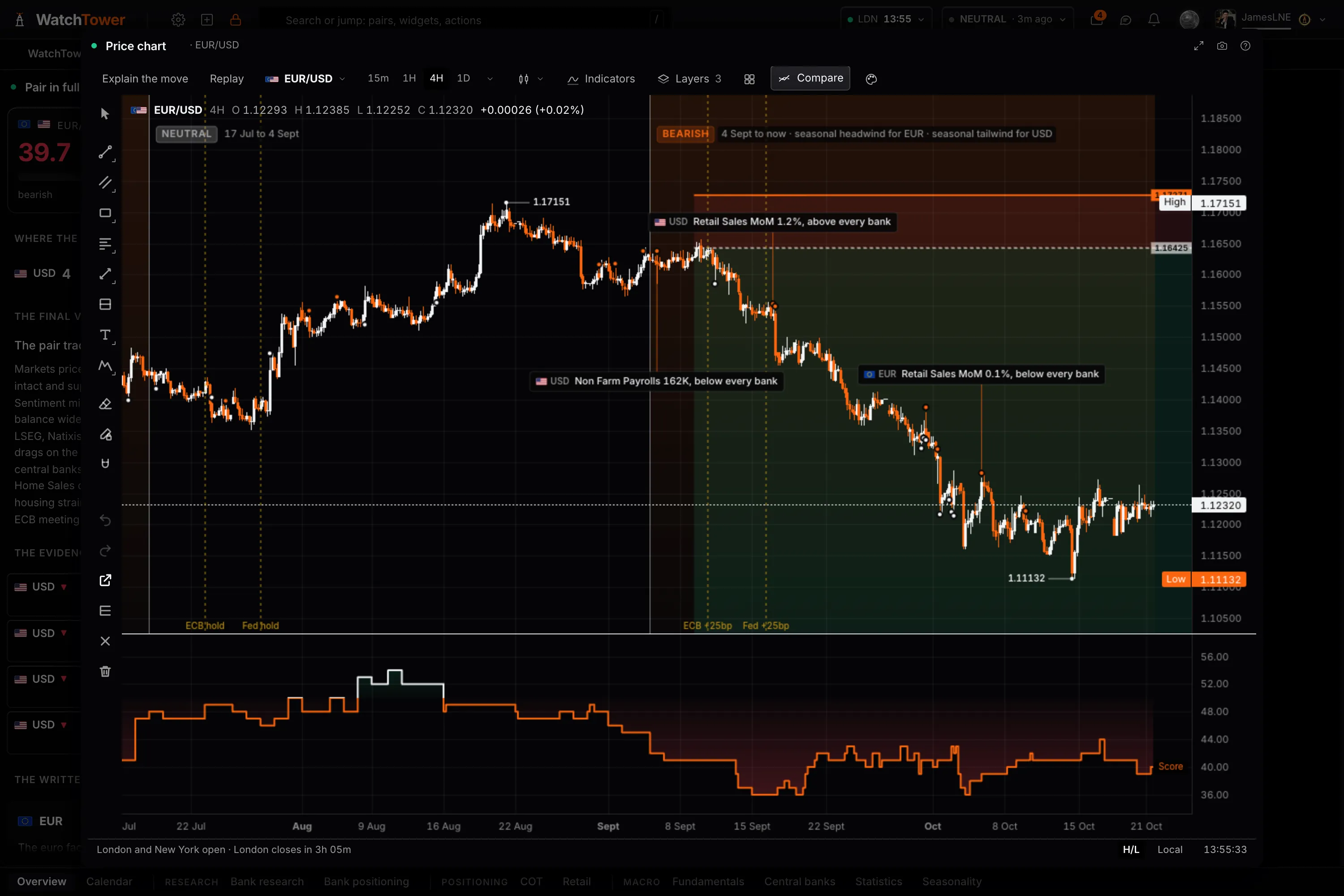
This is not a charting package and it will not replace one. It exists because the score, the central bank decisions, the positioning extremes and the history of releases have to be drawn somewhere, and they only exist here. A chart is where a relationship becomes visible rather than remembered.
Four overlays
Things that exist nowhere else, so they can be drawn nowhere else.
- The composite score
- The engine reading for that market in its own pane, and score against price, on the same time axis, so a score that turned three weeks before the move is visible as a fact rather than remembered as an impression.
- Central bank decisions
- Where each decision landed on the series, so a move that began with a meeting is told apart from one that only happened near it. The desks' published levels are drawn too, on the Bank trades and Bank forecasts charts (Pro).
- Release history
- Where each economic release landed, marked on the series as the data prints layer, so the question "did this pair actually move on that print" has an answer you can see.
- Positioning extremes
- Where speculative positioning reached the edge of its own range, which is rarely where price turned but is usually near it.
Depth
Where each one wins, honestly.
Being straight about it
Keep using the chart you already use.
If charting is the centre of your process, nothing here should change that. There are fewer drawing tools, fewer indicators, fewer instruments, no scripting and only price alerts, on Pro, and a reader who charts seriously will notice all of that inside ten seconds.
What this chart is for is the question that needs two things on one picture: did the score turn before the move, did the pair react to the last three prints, where was price when the central bank decided. Answering those in the same window as the rest of the work is the whole of the claim, and it is a small one. On Pro, Replay lets you practise it: play a market forward from any moment in the last year and decide before each release lands.
Charting, answered.
Is this a replacement for a dedicated charting platform?
No. A dedicated charting package has more drawing tools, more indicators, more instruments, scripting and fuller alerting, and its chart is better than this one. If charting is the centre of your process, keep using it. The Price chart exists so the terminal's own data has somewhere to be drawn.
What can be drawn here that cannot be drawn there?
The composite score on the same time axis as the price, the central bank decisions, the economic releases as they printed, where COT positioning reached an extreme, retail positioning and seasonality. On Pro, Explain the move reads what carried the move on screen, and Replay plays any market forward from a moment in the last year as the terminal knew it then. None of that is available anywhere else, because none of it exists anywhere else.
Why does that matter?
Because the useful question is usually about the relationship rather than the price. Did the score turn before the move or after it. Did the pair react to the last three prints or ignore them. Where was price when the central bank decided. Those are answered by looking, and only if the two things are on the same picture.
How many markets can it chart?
44 markets: the FX majors and crosses, metals and energy, the equity indices and the terminal's own currency indices, from 5 minutes to monthly. The 24 markets the terminal scores are all among them.
Can I put a chart on my own board?
Yes. The Price chart is a panel like any other, holding up to 16 charts kept in step, so it sits beside the research, the calendar or the positioning rather than in a separate window, and its settings save with the board.
Is it free?
The Price chart is on the free plan, along with 15 of the 49 panels overall. Replay, Explain the move, the Market regime layer and price alerts are Pro, and every new account starts with 14 days of Pro with no card.